Dashboard
Improve clarity, usability, and engagement on the dashboard.
00
Problem
The dashboard lacked structure and visual hierarchy. Excessive, poorly-prioritized CTAs distracted from core information, while minimal actionable insights left users unclear about their financial status or what to do next.
Solution
The dashboard was designed with a clear information hierarchy, removed distracting CTAs, and surfaced actionable insights that guided users toward their goals. The redesigned interface reduced cognitive load, simplified decision-making, and created a more intuitive experience that supported both user needs and key product metrics.
Overview
The Recordent dashboard underwent a significant redesign to improve usability, information architecture, and visual hierarchy. This case study examines the key problems in the original design and how the redesigned version addressed them through thoughtful layout restructuring, improved navigation, and enhanced content organization.
Problems in the Original Design
Layout & Information Architecture:
The original design suffered from poor spatial organization and overwhelming content density. All major components—Collections Overview, Overdue Rate, Payment Status, Collections Performance, Recovery via Legal Notices, and Caution Notices were displayed simultaneously in a grid format with minimal visual distinction between sections. This created cognitive overload, as users had to process multiple data points and card types without a clear prioritization system.
The horizontal card layout extended across the full width of the viewport, making it difficult for users to scan related information vertically. Content felt scattered rather than grouped by logical task flows or user objectives.
Navigation & Sidebar:
The original design featured a top navigation bar with limited visual affordance. The navigation items lacked clear hierarchy, with Analytics being added onto the Recordent feature stack. Users could not quickly identify their current location within the application due to weak visual feedback on active navigation items.
Card Design & Visual Grouping:
The original dashboard used inconsistently styled cards. Some cards featured icons, others didn't. Button styles varied without clear semantic meaning. This lack of consistency made it harder for users. Cards appeared isolated rather than grouped into logical modules, requiring users to cognitively connect related information across the dashboard. The action cards were meant to help users move forward, but the dashboard lacked personalization. New users and large-scale users saw the same layout, making it difficult to assess business performance or understand the next best actions.
Data Presentation:
Metrics were presented in a dense format without proper breathing room. The "Usage Summary" section on the right side packed multiple pieces of information with inconsistent layout, making it difficult to scan quickly.
Support & Guidance:
The original design provided minimal contextual support or guidance. There was no micro-copy explaining why users should update payment information or what the "Buy Credits" button accomplishes. Users had to infer the purpose of each section without clear guidance.
Design Solutions Implemented
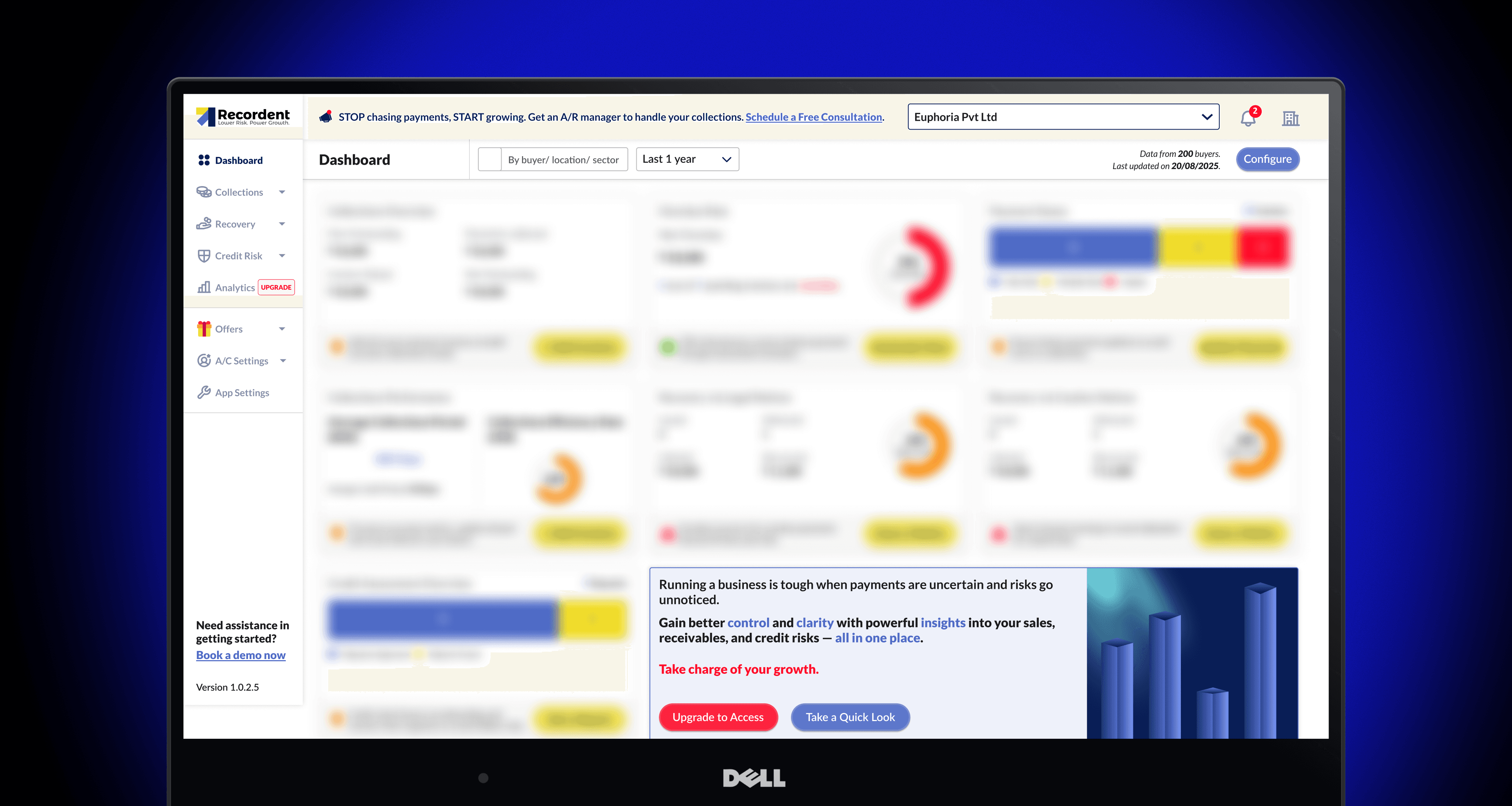
The redesigned dashboard went through a sophisticated evolution, scaling from a streamlined low-data state to a comprehensive high-data analytics dashboard while maintaining clarity, hierarchy, and usability. This analysis focuses on the design decisions, scalability patterns, and advanced UX principles embedded in the final redesign.
Progressive Information Architecture: The redesign restructured the dashboard to support varying data densities intelligently.
Implemented sectional layout grouping related metrics by user workflow.
Created vertical scanning pattern aligned with natural reading behavior.
Established predictable expansion patterns for low-data to high-data states.
Added structural spacing and dividers for clear visual separation.
IMPACT: The dashboard now scales seamlessly from minimal information to comprehensive analytics without requiring design adjustments or creating visual chaos.
Enhanced Visualization: Moved beyond basic text-based metrics to incorporate richer visual representations.
Introduced gauge visualizations for key performance indicators.
Added contextual statements translating abstract metrics into business meaning.
Paired numeric values with visual indicators showing status or urgency.
Implemented semantic color coding for gauges reflecting metric status.
IMPACT: Users now understand not just what the metric is, but what it means in business context and whether it requires attention.
Refined Card Design: Established a consistent, reusable component system across all dashboard sections.
Created distinct card types with clear visual differentiation (primary metrics, insight cards, data tables).
Standardized typography, spacing, and alignment across all card components.
Implemented consistent labeling patterns for metric clarity.
Added visual indicators (icons, alerts) for status and urgency within cards.
IMPACT: The component system provides a scalable foundation for adding new metrics without sacrificing visual coherence or usability.
Contextual Call-to-Actions: Replaced generic buttons with purpose-driven, contextually relevant actions.
Positioned action buttons directly on relevant cards rather than in separate panels.
Implemented semantic labeling reflecting the action outcome, not navigation.
Added color coding to buttons indicating priority level (primary, secondary, urgent).
Integrated CTAs with alert or insight context on each card.
IMPACT: Users understand what each action accomplishes and why they should take it, reducing friction between problem recognition and action.
Advanced Table Components: Enhanced data table design for improved scannability and context.
Implemented right-aligned numeric columns for easier comparison.
Added percentage annotations and context for absolute values.
Included visual separators between table rows.
Standardized typography and spacing across all data tables.
Implied interactivity through expand/detail affordances.
IMPACT: Users can quickly identify trends and outliers in list-based data without extensive cognitive effort.
Premium Feature Integration: Incorporated upgrade opportunities without compromising core dashboard usability.
Positioned premium offers contextually within the dashboard.
Used benefit-focused language rather than feature-focused marketing.
Maintained full functionality of core dashboard without requiring upgrades.
Made upgrade path visible but non-intrusive.
IMPACT: Premium users have clear upgrade path for advanced features while basic users remain fully supported.
This redesign demonstrates how systematic thinking about information architecture, visual hierarchy, and user guidance transforms a functional dashboard into an intuitive, actionable tool. By prioritizing clarity over feature density and guidance over complexity, the redesign enables users to quickly understand their business status and take appropriate action - the core objective of an analytics dashboard. The project exemplifies principles applicable to enterprise SaaS design across industries: scalability, consistency, clarity, and user-centered guidance.
This was a project undertaken under a strict confidentiality agreement. Specific details have been hidden, but I am happy to discuss the approach and learnings. Feel free to reach out.
See also